
E, R, and F in Sword Hunter
Attack or catch, toggle auto-attack, and select the blade you actually merged.
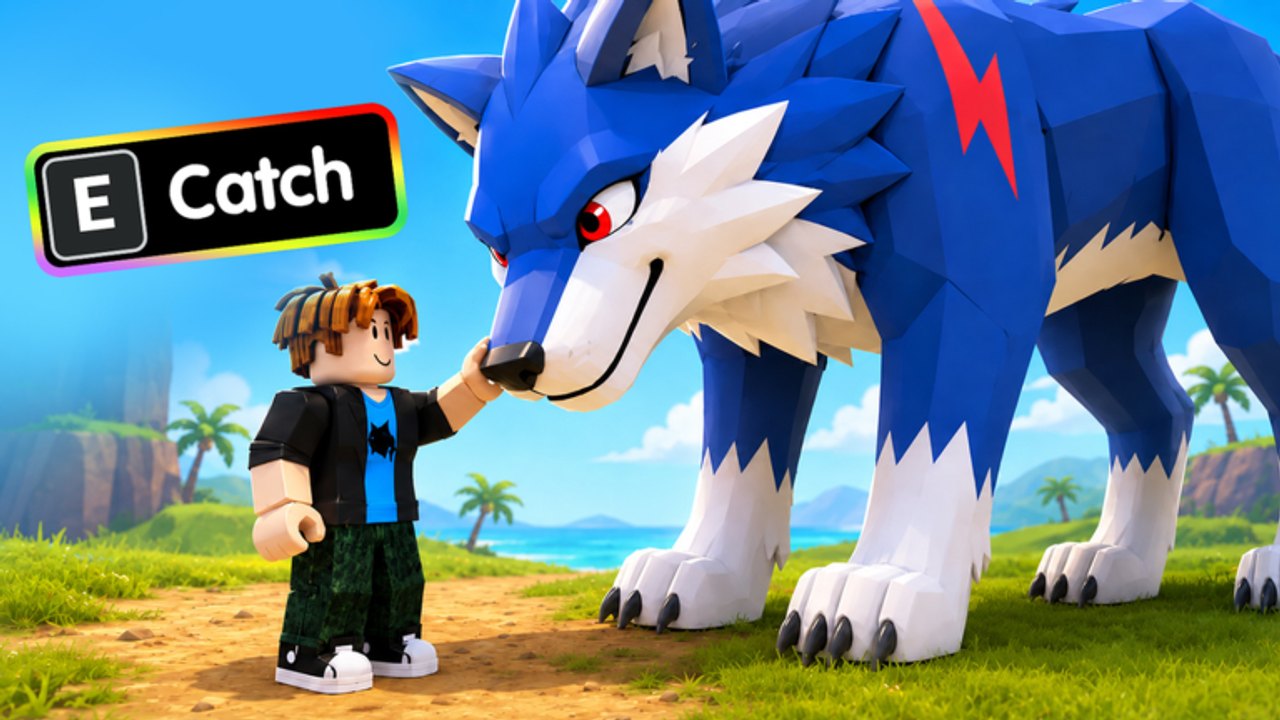
Sword Hunter uses three actions for almost everything you do on the islands: E, R, and F. The game is a free Roblox incremental simulator, so the keyboard (or the matching on-screen buttons) has to cover hunting, catching pets, and swapping blades after a merge. If auto-attack will not stop, or if you keep swinging a stick after you merged, you are fighting the controls rather than the monsters.
This page is the control reference. Pair it with the beginner first-hour plan if you just installed the game, and with the monster farm guide once E and R feel automatic.
E: Attack or Catch
E is the context action.
- When you are facing monsters and no pet prompt is up, E attacks.
- When a catch prompt is up, E catches. Official art shows E Catch on a blue wolf, which is the clearest picture of the control in the whole game.
That dual use is the whole beginner trap. If you leave auto-attack running and walk onto a wolf, you may keep swinging instead of catching. If you mash E hoping to attack through a catch prompt, you grab the pet (or fail the catch) instead of dealing damage.
Treat E as “do the highlighted action,” not as a dedicated attack key. Look at the prompt before you tap. Blue wolves, rainbow wolves, foxes, slimes, gorillas, and birds can all steal the key when they want to be caught. The pet hatch guide lists which creatures you should actually stop a farm for.
R: Toggle Auto Attack
R turns auto-attack on and off. It is a toggle, not a hold. Tap once to start swinging as you walk packs. Tap again to stop.
Leave auto-attack on when:
- You are clearing a beach or jungle pack for loot.
- You are walking a route and do not care about pets for a minute.
- You are in a 12-player server and just need cash for the next merge.
Leave auto-attack off when:
- A catch prompt is visible and you want E to mean Catch.
- You are lining up a careful hit on the giant red gorilla boss and do not want the character lunging at the wrong target.
- You are standing at base about to merge and do not need to swing at nothing.
If you think Catch is broken, toggle R off first. Most “I cannot catch the wolf” reports are auto-attack eating the E press. Turn R off, face the pet, press E, then turn R back on and return to the pack.
F: Select Sword
F selects your sword. After a merge at base, the blade you just built is not always the one you are swinging. Press F, confirm you are holding the new steel, gold, gem, or later rainbow crystal, then leave base.
F matters more as the ladder grows. The visible path runs LV.1 stick to steel or gold blades, cave gem sword, rainbow crystal LV.999, and the huge blue Rank 999 sword. If you merge and forget F, you can spend a whole farm looking like you still have a stick. The merge swords guide covers when to merge; this page covers the one key that makes the merge real in your hands.
If loot feels slow after an upgrade, check F before you assume the merge failed. Then check whether you parked the new sword for offline loot instead of the old stick.
Auto-attack versus catch
Think of R as the farm switch and E as the exception key.
- Walk into a pack with R on.
- When a pet you want appears, tap R to stop auto-attack.
- Face the pet, press E to catch.
- Tap R again and return to the pack.
Skipping step 2 is how you kill time next to a blue wolf without catching it. Skipping step 4 is how you stand still after a catch while the pack walks away. The hatch pets page is about which pets are worth that four-step break. Phoenix at 0.01% is worth stopping a farm. A duplicate slime might not be.
Friends in the same 12-player server can call out catch prompts in voice chat. You still have to toggle R yourself. Nobody else can press E for you.
Mobile notes
On a phone or tablet, E, R, and F map to on-screen action buttons rather than keyboard keys. The labels still match: Attack or Catch, Auto Attack, Select Sword. A few mobile-specific habits help:
- Keep your thumb off Auto Attack while a Catch label is showing. The toggle is easy to bump.
- After a merge, tap Select Sword once before you leave base. On a small screen it is easy to walk out still holding the stick.
- Do not cover the Catch prompt with the movement stick. Strafe until the prompt is readable, then tap.
- If the UI feels crowded during the giant gorilla fight, turn auto-attack off so one tap is one action.
Roblox system jump and camera controls still work as they do in other experiences. Sword Hunter does not replace those; it only adds the three hunter actions.
Common control mistakes
Swinging after a merge. You forgot F. Select the new blade, then farm.
Cannot catch anything. R is still on. Toggle auto-attack off, then E.
Attack does nothing. You may be facing a catchable pet, or you may be on a pack your current sword cannot hurt. Back up to weaker monsters; the farm guide explains when to move islands.
Auto-attack will not start. You toggled it off to catch and never toggled back. Tap R once and watch for swings.
Wrong sword while offline. You parked the stick. Select the merged blade before you log off so offline collection runs on the upgrade you paid for.
Once E, R, and F feel automatic, stop thinking about the keyboard and go back to routing packs. Controls are a solved problem; cash and merges are not. The Guides Hub lists the economy pages in reading order, and the early-game hunter plan assumes you can already toggle catch without looking at your fingers.
Frequently Asked Questions
Quick answers to the most common Sword Hunter questions.
What does E do in Sword Hunter?
E attacks monsters, or catches a pet when a catch prompt is showing. Official art labels it E Catch on a blue wolf. See the pet hatch guide for which prompts to stop for.
What does R do in Sword Hunter?
R toggles auto-attack on and off. Leave it on to farm packs, and turn it off before you try to catch. The monster farm page assumes auto-attack is on during loot loops.
What does F do in Sword Hunter?
F selects your sword. Press it after every merge so you swing the new blade instead of the stick. Merge order is on the merge swords guide.
Why can I not catch the blue wolf?
Auto-attack is probably still on, so E keeps attacking. Toggle R off, face the wolf, press E, then turn auto-attack back on.
Do mobile players use different Sword Hunter controls?
No new actions. E, R, and F appear as on-screen buttons with the same labels. Watch your thumbs on the auto-attack toggle when a Catch prompt is up.
Should I leave auto-attack on all the time?
During farms, yes. Turn it off for catches, careful boss swings, and base visits. Then turn it back on before the next pack.